
The blog · Implementation · 7 min
How do you build a trigger-based workflow in Clay?
Catch the event, qualify it before you enrich it, then the company, then the people, and only then send. Start with triggers about people, not industries.

A trigger-based workflow in Clay is a chain of tables that turns an event into a reached-out lead: a source catches the trigger, a cheap check throws away the ones that do not fit, enrichment fills in the company and then the people, and only the leads that pass every check are sent to a campaign or to a rep in Slack. The order is the whole design. Qualify before you enrich, start with triggers about people before triggers about whole industries, and measure each trigger against the same outreach without it.
What does a trigger-based workflow look like, step by step?
A trigger-based workflow has six steps, and each one either adds data or removes rows. Removing rows early is what keeps it fast and cheap.
- Catch the trigger. A source writes each new event as a row: a job post, a newsletter signup, a booked meeting, a website visit, a funding announcement from a news feed.
- Qualify the trigger. Using only the data the trigger arrived with, decide whether it is worth anything: the right country, the right kind of role, a company that is not obviously too big or too small. Drop the rest, or store them somewhere else.
- Enrich and qualify the company. Add size, industry, location and a description, then check the company against your profile.
- Find the people. At a qualified company, find the people whose titles match the buyer you sell to, because the person who set off a signal is often not the buyer, as the 6sense comparison warns.
- Enrich and qualify the people. Add their LinkedIn profile and contact data, and check them as well.
- Act. Send the leads that passed to an email or LinkedIn campaign, or post them to a Slack channel for a rep to pick up.
A job-post trigger shows why. Watch every sales job posted in the United States and you will see hundreds a day; most are from companies outside your market. A short check on the title, the location and the company name in step two removes most of them before any enrichment runs. Steps three to five then run on a few rows instead of hundreds.
Which trigger level should you build first?
Build lead-level triggers first, because they need the fewest steps. Triggers come at three levels, the same three signal levels The Demand Compass uses: industry, company and lead.
| Level | Examples | What the workflow still has to do |
|---|---|---|
| Industry | News about a market, a regulation, a trend | Find the companies it affects, then their people |
| Company | A funding round, a job post, a new location, an expansion announcement | Qualify the company, then find its people |
| Lead | A newsletter signup, a meeting booked, a reaction to your post, a visit to your pricing page | Enrich and qualify the person |
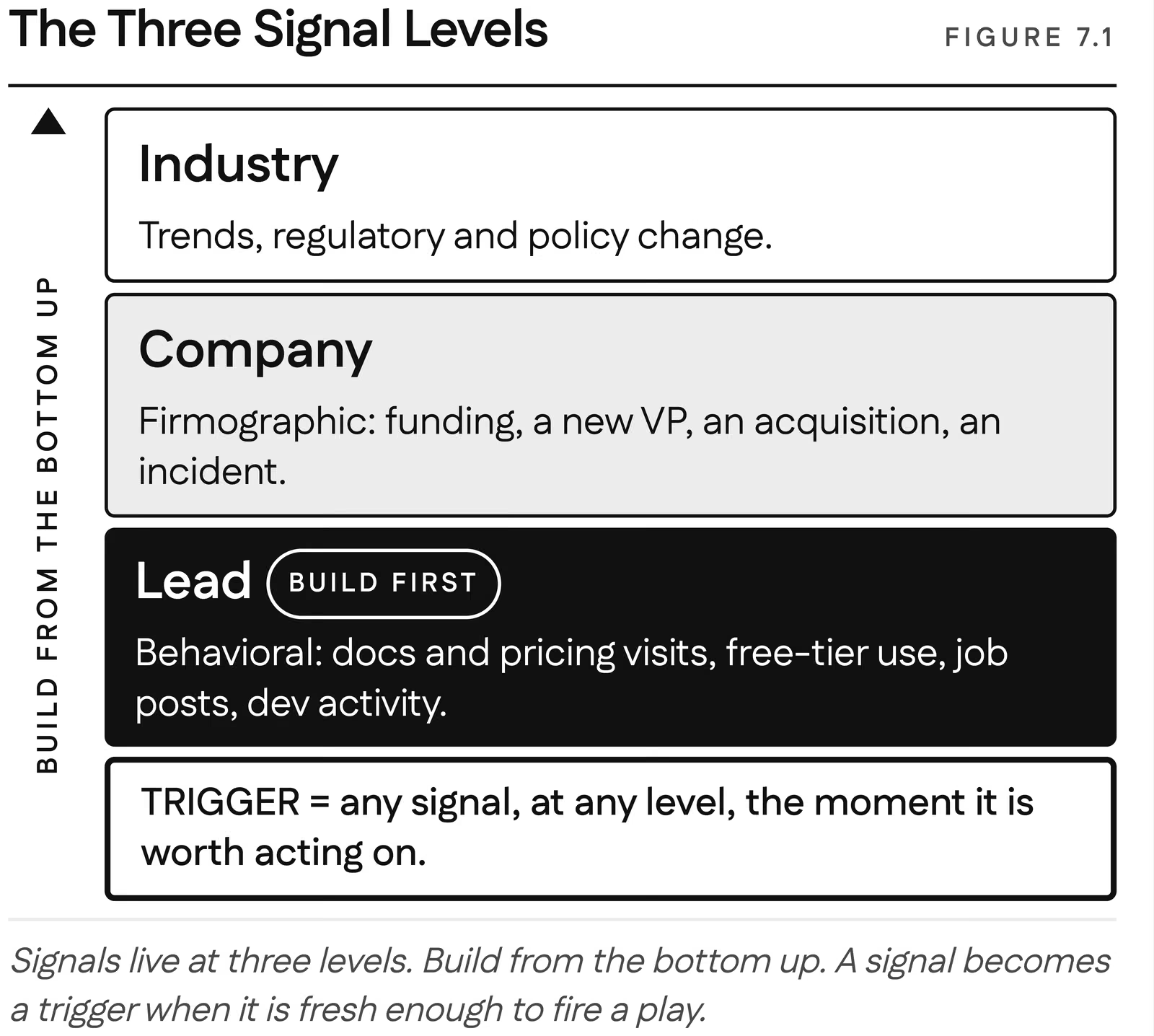
An industry trigger starts furthest from a person and needs the whole chain. A lead trigger starts with a person who has just done something, so the workflow only has to confirm they fit. Get one lead-level workflow running end to end, then add a company-level one.
What is the difference between a trigger and an intent signal?
A trigger is about timing and context at the level of the company or the industry; an intent signal is about one person's interest and how close they are to buying. A funding round is a trigger: the company has budget and reasons to spend it, but nobody there has shown interest in you. A newsletter signup is an intent signal: one person chose to hear from you. Both on the same account is the combination worth waiting for: a person who signed up for your newsletter, at a company that just raised money.
That is why the two are worth watching together. Triggers say when an account might move, which is the readiness to buy side; intent signals from your own channels say whether anyone there knows you, which is the brand awareness side. One without the other gives you either the right moment with strangers or familiar people at the wrong moment.
What are three trigger-based workflows to start with?
Three workflows we run ourselves are good first builds, because they start from data you already own.
The newsletter signup. The form asks for an email address and nothing else, because every extra field lowers signups. Clay enriches the address with name, company, title and location, checks the person against the profile, a small scoring job that AI can help with at the edges, and against a blocklist, and sends the ones who fit to a LinkedIn campaign. People who have just engaged with our content accept a connection request 90 to 100 percent of the time, against near 20 percent for cold requests into the same profile. Source: automate rev.ops., our own sends, The Demand Compass, chapter 18
The booked meeting. When someone books a call, the booking tool sends the form answers to Clay. Clay researches the person and the company, writes a short brief, adds the record to the CRM and posts the brief to Slack, so whoever takes the call walks in prepared.
The website visitor. A visitor-identification tool names the people or companies on your site, and Clay qualifies them and routes the good ones. This one depends on your site. It works when you have traffic and pages that mean something, a pricing page, a comparison page, documentation. For us, with a small site and only the newsletter page to watch, it underperformed: some identifications were wrong and few visitors fit the profile. More on when it pays in what website visitor de-anonymization is and why to start there.
Both on the same account is the combination worth waiting for: a person who signed up for your newsletter, at a company that just raised money.
Should the message mention the trigger?
Usually not. Telling someone "I saw you commented on my competitor's post" proves you are watching them, and it reads that way. Use the trigger to choose the moment and the reason to write, and let the message be about their problem. The reader should feel the timing was good, not see how you found it. A job post is the exception that works: what a company says it is hiring for, and the tools it names in the description, is public and about the business, so it can inform what you offer without quoting it back.
How do you know a trigger is working?
Measure each trigger against the same outreach without it. Run the triggered list and a comparable untriggered list through the same message and compare connection and reply rates. In our deployments, cold qualified LinkedIn outreach is accepted about 21 percent of the time and replied to about 17 percent; followers of an adjacent solution accept at 41 percent and reply at 38. [source: automate rev.ops., our own sends, The Demand Compass, chapter 18] A trigger that does not move those numbers for you is costing setup and enrichment for nothing, however good it sounds. Which triggers to test first is covered in how to prioritize buying triggers, and which tool catches which in what buying triggers you can automate.
Related questions
How long does a first trigger-based workflow take to build?
A lead-level workflow on data you already own, a newsletter signup or a booked meeting, is a few hours in Clay once the profile is written down. Industry-level workflows take longer, because the chain from a news item to a person has more steps to get right.
How many triggers should you run at once?
Start with one, the highest-value trigger that is easiest to detect, and run it end to end before adding a second. A single working workflow teaches you more than five half-built ones.
Should you delete triggers that do not qualify?
For high-volume triggers like job posts, yes, or move them out of the working table, so the table stays fast and the qualified rows are easy to see. For rare triggers, keep them: a company that did not fit this month may fit next quarter.
Can a trigger-based workflow run without anyone checking it?
The detection, qualification and drafting can run on their own. What gets sent, and the reply to an interested person, should still pass through a human in the loop.